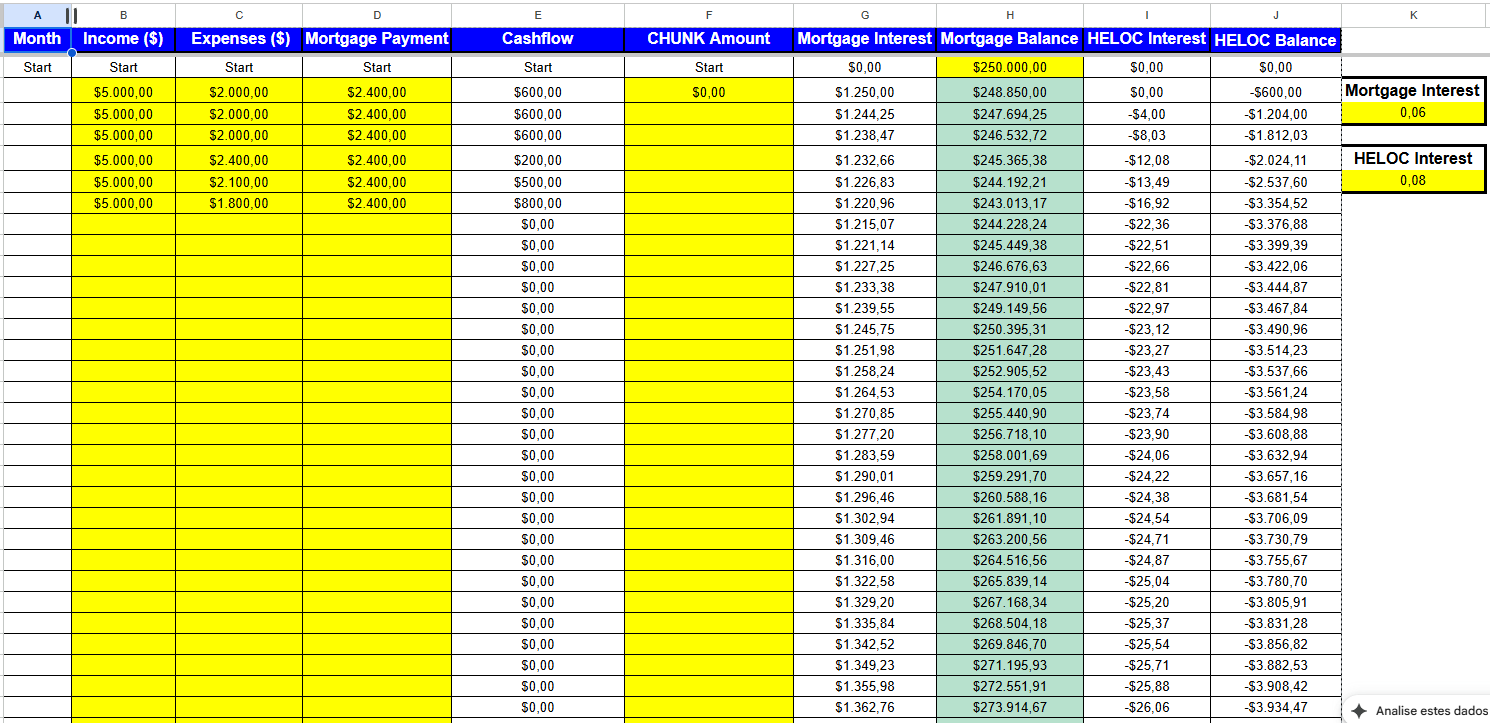

Download a workbook that runs minimum payments, extra principal and a HELOC chunk path on your own numbers. The Schedule, Results, Freeze and Checks tabs are live formulas; the Sensitivity tab is pasted values, and each tab says which. It does not say which path wins for your loan: on some inputs the HELOC path finishes later. It also does not compute break-even in a cell; you find it with Goal Seek.
Download velocity-banking-spreadsheet-rm-1.1.xlsx (version RM-1.1, workbook v1.0, September 20, 2026). No sign-up.
Illustrative model, not financial, tax or legal advice. A HELOC is secured by your home. Results depend on your rate, fees, balance, term and cash flow and do not transfer to your loan.
What does this spreadsheet not tell you?
It does not transfer any example result to your loan, and it leaves out taxes, PMI, annual line fees, rate caps, lender freezes and changes in home value. Rates, fees, the cap and the chunk are scenario inputs, not quotes from any lender. Paycheck parking is not in this workbook, so the parking figures on the comparison page cannot be reproduced here.
What does each tab do?
- Inputs (yellow cells are yours): home value, balance, rate, months left, surplus, CLTV cap, requested limit, HELOC rate, fee, chunk size, redeploy switch, income and escrow. Loan B and Loan A presets sit beside them.
- Schedule (live): monthly rows for the extra-payments path (S1) and the HELOC chunk path (S2), up to 360 months. Here is the same schedule followed for one loan, with the terms defined.
- Results (live): months to debt-free, interest, net position at the horizon and the gap between S2 and S1.
- Freeze (live): what you would have to carry each month if new draws stopped at a month you choose, and the cash needed for six months with no income. The risks page explains the test and shows it for two example loans.
- Checks (live): the model against Excel NPER and a closed form, cash conservation, and the identity test.
- Sensitivity (pasted values): break-even minus mortgage rate for the two preset loans, from the scripted run.
How do you run your own loan in five steps?
- Type your balance, mortgage rate, months left and the surplus you would have after every payment including escrow.
- Enter the line’s limit request, CLTV cap, rate and fee from your lender’s actual offer.
- Read the gap on Results: positive means the HELOC path finishes ahead on net position at the horizon.
- Run the identity test: set the HELOC rate equal to the mortgage rate and the fee to 0; the gap must be 0.00.
- To find the break-even, use Data, What-If Analysis, Goal Seek: set Results!B14 to 0 by changing Inputs!B9. Compare that rate with your line’s rate.
How is break-even defined here?
Every path gets the same cash each month. Cash not needed for debt is kept at 0% interest. Net position at the end of the original mortgage term is cash kept minus debt still owed minus the fee. The break-even is the line rate at which the HELOC path’s net position equals the extra-payments path’s. The sheet defines it; it does not publish break-even values, which belong to the comparison of two example loans.
What was the model compared with?
| Check | Result |
|---|---|
| Months to debt-free for S0 and S1 versus the NPER formula (rounded up); in the workbook’s Checks tab and as a closed form in the script | Equal on both loans |
| Total interest for S0 and S1 versus a closed form with the final partial payment | Differences under $0.01 on both loans |
| Cash in = cash kept + principal + interest (workbook Checks tab, S1 and S2) | Holds to the cent |
| Identity: HELOC rate = mortgage rate, fee = 0 | S2 and S1 total debt equal every month; gap = $0.00 |
| Workbook against the scripted model (S1, S2, interest, net, gap, Freeze tab) | Matched to the cent on both presets |
| A second script in another language versus the model (S1, S2) | Matched to the cent on both loans |
Not checked this way: the HELOC path (S2) and the freeze results have no closed form. The workbook’s formulas were recalculated by a Python spreadsheet engine, not by desktop Excel, Google Sheets or Numbers; if a function fails in your program, tell us. A second-person review of the model is still open.
Frequently asked questions
Is the spreadsheet free?
Yes, and the download needs no sign-up.
Does it include escrow?
Escrow is outside the math. Enter your surplus after escrow; the Freeze tab uses it only to size your monthly obligations.
Why does the fee default to a non-zero amount?
A zero fee is the most favorable case for the HELOC path. The preset uses $750 as a scenario; enter your lender’s actual number.
Can I track my actual chunks over time?
This workbook is a model, not a ledger. To log real chunks and payments as they happen, our Velocity Mortgage App has a chunk tracker for subscribers. It projects the HELOC path against minimum payments, so keep using the workbook for the comparison with extra payments.
Does it work in Google Sheets?
Not tested. It uses PMT, NPER, MIN, MAX, IF, INDEX, MATCH, SUMIF and ROUNDUP.
Related: two examples compared, risks, what it is, month by month, the three tests.

About the Author Michael
MBA in Quantitative Finance – Wharton School (University of Pennsylvania)."I built products for the banks. Now, I dismantle them for you."Michael Schmidt is a veteran financial strategist and the architect of the Mortgage Killer Method.With over 15 years of experience inside America's largest lending institutions, Michael worked behind closed doors structuring mortgage backed-securities. He saw firsthand how the "30-year fixed" system is engineered to prioritize institutional profit over homeowner equity.In 2015, Michael walked away from Wall Street with a clear objective: to reverse-engineer banking mathematics for the average American family. He specializes in aggressive principal reduction strategies, using HELOCs to cut amortization timelines by decades.Michael brings German precision to debt management. His frameworks are not theories—they are mathematical certainties. To date, he has helped over 1,500 families reclaim an estimated $50 million in interest from the banking system.Expertise: Strategic Debt Elimination, Amortization Mechanics, Cash Flow Optimization.Background: Former VP of Lending Strategies.
3 thoughts on “Velocity Banking Spreadsheet: Formulas and Limits”